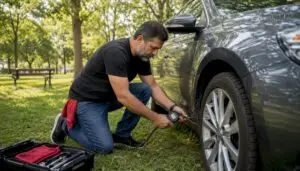

Start a single, dated service file today that pairs every shop-issued invoice with a one-line summary and the odometer reading. This one habit is your best defense when a warranty claim gets questioned or a buyer asks for proof of care.
Here’s your three-item starter checklist for every shop visit:
- Date and mileage recorded on the invoice before you leave the lot
- Shop name, address, and phone number printed on the repair order
- Itemized invoice or repair order listing every part and labor charge separately
Organized maintenance records are the single most important tool when filing a warranty claim. Under the Magnuson-Moss Warranty Act, a manufacturer must prove neglect caused a failure before denying coverage, but a missing receipt hands them that argument on a silver platter. Start the file now, not after the next problem shows up.
Pro Tip: Ask the service advisor to confirm the odometer reading on the repair order before you hand over your keys. That one number ties the invoice to a specific point in your car’s life and makes the record nearly impossible to dispute.
Key Takeaways
Properly documented car repair history protects your warranty rights, speeds claims approval, and directly supports resale value when you’re ready to sell.
| Point | Details |
|---|---|
| Start a dated service file today | Pair every shop invoice with a one-line summary and the odometer reading at each visit. |
| Insist on itemized invoices | Every repair order must include VIN, odometer, part numbers, fluid specs, and shop contact info. |
| Scan receipts the same day | Thermal paper fades within a year; a same-day photo or scan preserves the record permanently. |
| Know your Magnuson-Moss rights | Manufacturers must prove neglect caused a failure; organized records shift that burden back to them. |
| Expresslubearlington documents every visit | The shop provides itemized repair orders, digital inspections, emailed PDFs, and a printed 24-month/24,000-mile warranty on every job. |
Table of Contents
- What should you record for every professional service?
- How should you organize and store your maintenance records?
- Build a one-page service summary your buyer can read in 60 seconds
- How to document DIY repairs so they hold up alongside shop invoices
- Step-by-step: what to bring when you file a warranty claim
- What should you ask a shop before trusting them with your records?
- How Expresslubearlington documents your repairs from start to finish
- Why documentation is the real service we provide
- Expresslubearlington keeps your repair history clean and complete
- Sources
- FAQ
What should you record for every professional service?
A defensible vehicle service record is only as strong as its weakest field. Professional repair orders and itemized invoices are the primary evidence warranty reviewers accept, so every invoice needs to carry the right data from the start.
Required invoice fields to verify at every visit:
- Vehicle Identification Number (VIN)
- Service date and odometer reading
- Shop’s legal business name, street address, and phone number
- Technician ID or name (when available)
- Itemized parts and labor listed as separate line items
- Part numbers and fluid specifications (viscosity grade, capacity)
- New, used, or remanufactured designation for every part installed
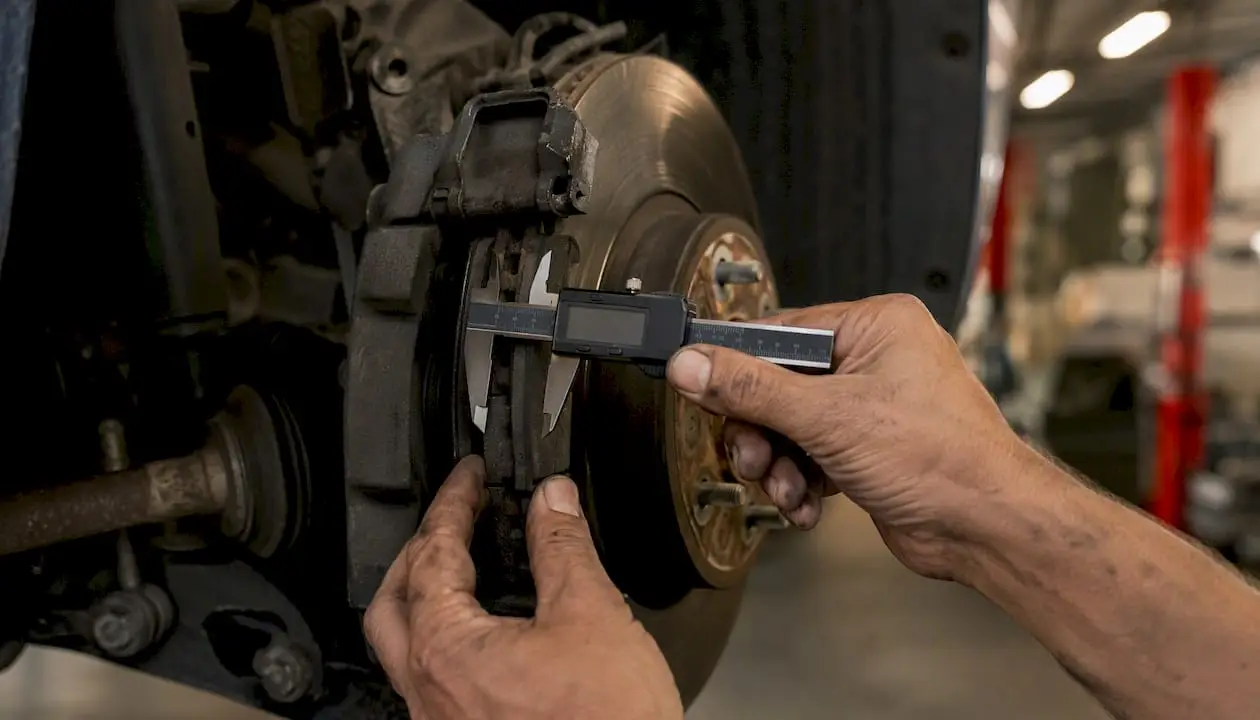
For major services like timing belt replacement, transmission rebuilds, or 100,000-mile services, keep the part packaging and any included warranty slips alongside the invoice. Inspection records that include measurements such as brake-pad thickness, fluid color, and urgency categorization create continuity of care and serve as evidence in resale, warranty, or insurance situations.
| Invoice Field | Why It Matters |
|---|---|
| VIN | Ties the record to your specific vehicle, not just the make/model |
| Odometer reading | Establishes the service interval and supports warranty timelines |
| Itemized parts + labor | Prevents disputes over what was done and what was charged |
| Part numbers + fluid specs | Proves manufacturer-approved materials were used |
| Shop legal name + contact | Allows warranty reviewers to verify the work directly |
| New/used/rebuilt designation | Affects parts warranties and resale disclosures |
Pro Tip: Before you leave the shop, flip to the parts section of the invoice and confirm every fluid listed shows a specification (e.g., “5W-30 full synthetic”). A generic entry like “oil” gives a warranty reviewer room to question compliance with your manufacturer’s schedule.
How should you organize and store your maintenance records?
A folder that lives in your glove box and a mirrored digital copy are all you need. The physical copy is your backup when apps go down; the digital copy is your backup when the folder gets left behind.
Recommended folder structure (one folder per vehicle):
/Invoices— every shop-issued repair order, in date order/Inspections— digital vehicle inspection reports and photos/Photos— before/after images, odometer shots, removed parts/Warranty Docs— manufacturer warranty booklet, extended warranty, parts warranties
File-naming pattern: YYYY-MM-DD_mileage_service_shop.pdf
Example: 2025-03-15_62400_oilchange_expresslube.pdf
Follow this scan-and-upload workflow after every visit:
- Photograph thermal receipts the same day you receive them. Thermal paper fades within a year, so a photo taken that evening is worth more than the original receipt six months later.
- Rename the file using the pattern above and save it to your
/Invoicesfolder. - Upload to Google Drive or Dropbox as your primary cloud backup.
- Log the visit in myCARFAX or your manufacturer’s owner portal as a supplementary timestamped record.
Digital tools and manufacturer portals supplement records but are not a substitute for the shop-issued invoice. Store both. Under the federal E-SIGN Act, electronic receipts are legally valid, but you must download and archive them yourself. An email sitting in your inbox is effectively lost if the account closes or the provider changes.
Tools that work well alongside this workflow: myCARFAX and CARFAX Car Care for timestamped service logs, Google Drive or Dropbox for cloud storage, and Evernote for annotated notes tied to specific invoices. Schedule a yearly review every January to update your one-page summary (covered next) and purge duplicates.
Build a one-page service summary your buyer can read in 60 seconds
A one-page service-history summary paired with original invoices gives buyers and service advisors immediate clarity without wading through a stack of receipts. Think of it as the table of contents for your car’s entire life story.
Fields to include in every row:
- Date of service
- Odometer at service
- Service type (concise: “Oil Change,” “Timing Belt,” “Brake Pads F/R”)
- Shop name
- Invoice reference number
- Cost
- Highlight flag for major items (use “★” or “MAJOR” in the last column)
Copy this template into a Google Sheet or a plain spreadsheet and update it after every visit. A messy folder of 40 loose invoices becomes a readable one-page file that speeds diagnostics and makes a private sale move faster. Pair it with your vehicle maintenance records and the resale conversation practically runs itself.
How to document DIY repairs so they hold up alongside shop invoices
DIY work gets dismissed in warranty disputes mostly because the documentation is thin. Two pieces of evidence fix that: the original retail receipt for every part or fluid, and a dated log entry with mileage and a description of what you did.
What to capture for each DIY job:
- Original retail receipt (AutoZone, O’Reilly, Amazon) with the purchase date visible
- A dated log entry: date, odometer, service performed, part name and part number
- Photo of the new part before installation
- Photo of the removed part after the job, with mileage written on it in marker
- At least one photo showing the odometer reading
Thermal receipts fade quickly, so scan or photograph them the same day. Save the digital copy to your /Invoices folder with the same naming convention you use for shop records. Pair it with a timestamped entry in myCARFAX or a note in Evernote so the log stays chronological.
Pro Tip: Write the vehicle’s mileage and your log entry number directly on the retail receipt in pen before you file it. That cross-reference makes it trivial to pull the matching photo and log entry if a warranty reviewer asks for proof.
Step-by-step: what to bring when you file a warranty claim
Filing a warranty claim without your records is like showing up to court without your evidence. Here’s the sequence that gives you the best shot at approval.
- Collect your documents: relevant invoices, your one-page summary, the owner’s manual with the warranty booklet, and any technician failure reports or diagnostic printouts.
- Hand the file to the service advisor before diagnostics start. Handing an organized maintenance file to the service advisor early speeds verification and reduces unnecessary follow-up.
- Make copies first. Keep originals at home; give the service advisor copies. Originals can get lost in a busy shop.
- Expect verification. The manufacturer or dealer will likely contact the shops listed on your invoices to confirm the work. That’s normal and works in your favor if records are complete.
- Know your rights. The FTC is clear: a dealer cannot refuse warranty coverage solely because you used an independent shop. Follow the manufacturer’s maintenance schedule and keep records, and you’re protected.
Under the Magnuson-Moss Warranty Act, the burden of proof falls on the manufacturer to show that your maintenance choices caused the failure — not on you to prove they didn’t. Your organized records make that burden very hard for them to meet.
Pro Tip: Attach a sticky note to the front of your file that lists the specific failure, the date it appeared, and the mileage at that point. Service advisors process dozens of claims a week; a one-line summary on top of your folder gets you faster, more accurate attention.
For a deeper look at what different warranty types cover, the car warranty services guide breaks it down clearly.
What should you ask a shop before trusting them with your records?
The shop you choose shapes the quality of your car repair documentation. Ask these questions at check-in and watch how the service advisor responds.
Questions to ask before you hand over your keys:
- Will I receive a fully itemized repair order with parts and labor listed separately?
- Will part numbers and fluid specifications appear on the invoice?
- Do your technicians perform digital vehicle inspections with photos?
- Is your warranty in writing, and what does it cover?
Trust signals worth looking for:
- Shop’s legal business name, address, and phone on every invoice
- ASE-certified technicians (ask to see the certification or look for posted credentials)
- RepairPal Certified or CarFax Top-Rated recognition
- Written repair warranty (a 24-month/24,000-mile warranty is a strong benchmark)
- Digital inspection reports emailed to you after the visit
Red flags that should give you pause:
- Refusal to itemize parts and labor separately
- Missing shop contact information on the invoice
- Thermal-only receipts with no digital copy offered
- Unwillingness to add the odometer reading to the repair order
When you use multiple shops, keep your chronological log entries consistent. Label each invoice with a visit number and note any work that was deferred or declined. That context matters when a new shop tries to diagnose a recurring issue. Trusted mechanics who document thoroughly make that coordination far easier.
How Expresslubearlington documents your repairs from start to finish
Expresslubearlington runs a documentation workflow that matches the defensible checklist above, step for step.
The process at every visit:
- Digital vehicle inspection at drop-off: technician notes, measurements, and photos captured before a wrench touches the car
- Itemized repair order generated with VIN, odometer, parts with numbers, fluid specifications, and new/remanufactured designations
- Emailed PDF invoice sent to the customer plus a printed copy handed over at pickup
- The shop’s 24-month/24,000-mile warranty appears as a printed line on every repair order
Sample invoice fields you’ll see on an Expresslubearlington repair order:
| Field | What the Shop Includes |
|---|---|
| VIN | VIN |
| Odometer | Recorded at drop-off and confirmed at pickup |
| Technician ID | ASE-certified tech name or ID on the order |
| Parts line items | Part name, part number, new/remanufactured status, unit cost |
| Labor line items | Labor description, flat-rate hours, labor rate |
| Fluid specifications | Viscosity grade, capacity, and brand where applicable |
| Warranty statement | 24-month/24,000-mile coverage printed on the order |
At Expresslubearlington, the repair order isn’t just a receipt — it’s a legal document that travels with your car’s history. Every field is filled in because a blank field is a gap a warranty reviewer will notice.
Trust signals on every Expresslubearlington document include the shop’s legal name and contact information, ASE technician credentials, RepairPal Certified status, and CarFax Top-Rated recognition. That combination means the records you leave with are the same records a manufacturer’s warranty department will accept without question.
Why documentation is the real service we provide
Good documentation isn’t paperwork overhead. It’s the thing that makes every other service we perform actually count.
When a technician records brake-pad thickness at 4mm and flags it yellow, that measurement becomes a reference point for the next visit. It tells the next technician exactly where things stood, without guessing. That continuity of care is what separates a shop that remembers your car from one that treats every visit like the first.
Bring your existing folder when you visit Expresslubearlington. If you don’t have one yet, we’ll help you start it. The service advisor can pull your VIN history, confirm prior mileage entries, and make sure your records are complete going forward.
Expresslubearlington keeps your repair history clean and complete
Drivers in the DFW area who want a shop that builds their vehicle service record the right way have a straightforward option at Expresslubearlington. Every visit produces an itemized repair order, a digital inspection with photos, and an emailed PDF you can drop straight into your cloud folder.
Bring your vehicle registration, warranty booklet, and any existing service folder. Tell the service advisor you want the odometer confirmed on the repair order, and ask for the digital inspection report by email. Those three requests take 30 seconds and make your records bulletproof.
Expresslubearlington’s 24-month/24,000-mile warranty is printed on every repair order, so the coverage is documented the moment the job is done. Whether you’re protecting a new car’s factory warranty or building a resale file for a vehicle you plan to sell, the records you get here hold up. Ready to get started? Book your next service and leave with a file worth keeping.
Sources
- How to Keep Vehicle Maintenance Records for Warranty Claims – LegalClarity
- How to Keep a Car Service History That Actually Helps at Resale
- Auto Warranties, Routine Maintenance, and Repairs: Is Using the Dealer a Must?
- Why Documenting Vehicle Findings Matters for Shops and Customers | The Informed Driver
FAQ
What should every car repair invoice include?
Every invoice needs the VIN, service date, odometer reading, shop legal name and contact information, itemized parts and labor with part numbers, fluid specifications, and a new/used/rebuilt designation for each part. Professional repair orders with these fields are the primary evidence warranty reviewers accept.
Can an independent shop’s records support a warranty claim?
Yes. FTC guidance states a dealer cannot deny warranty coverage solely because an independent shop performed the work, as long as you followed the manufacturer’s maintenance schedule and kept records.
How long should you keep car repair records?
Keep records at least through the full duration of all active warranties. For resale or insurance purposes, retaining the complete history for the life of the vehicle gives you the strongest position.
Do apps like myCARFAX replace original invoices?
No. Digital tools and manufacturer portals supplement your records but are not substitutes for the shop-issued repair order. Store both the original invoice and the app entry.
How does Expresslubearlington support warranty documentation?
Expresslubearlington provides a fully itemized repair order with VIN, odometer, part numbers, and fluid specs at every visit, plus an emailed PDF and a printed 24-month/24,000-mile warranty statement on the repair order itself.